My friend wanted to read a book I owned. Normally, I would’ve just let them borrow it. But there was one problem: the book was written in Bangla, a language my friend could not read.
At first, I considered translating the book myself. That idea did not last long. It would have taken far too much time.
Around the same time, I was participating in Expedition Tiny Aya, a research hackathon hosted by Cohere Labs. In the hackathon, teams of two to eight people worked under the guidance of experienced researchers to build on top of Cohere’s new multilingual model, which was small enough to run on a smartphone. As part of that work, I naturally started experimenting with the model’s Bangla capabilities, including translation. The results were surprisingly good for such a small model, and that gave me an idea: why not use an LLM to translate the book?
The most obvious solution would have been to use something like Gemini, Claude, or ChatGPT. But I decided against that for a few reasons.
First, I only had photos of the book’s pages, and a chat interface did not seem like the right tool for handling a large number of tasks. Second, when I tried Bengali-to-English translation with GPT-5.4, I found that although the writing was fine, the model sometimes introduced details that were not present in the source. Since the book was a biography, accuracy mattered far more to me than style. Third, I was on a sabbatical from software engineering and was looking for opportunities to gain more hands-on ML engineering experience before returning to work.
So, I decided to build my own translation service.
I started with a clear set of requirements. The system needed to accept either image files or text files as input. It needed to translate the extracted text into English and export the results as DOCX files. It had to support scheduled translation jobs, because I wanted heavy workloads to run overnight. It also needed a project abstraction so that related files, such as all the pages of a single book, could be grouped together. Finally, it needed to display the state of ongoing and completed projects, cost nothing to run, and work comfortably on my M4 MacBook Air.
Because I was the primary user, I chose the simplest possible interface: a command line application.
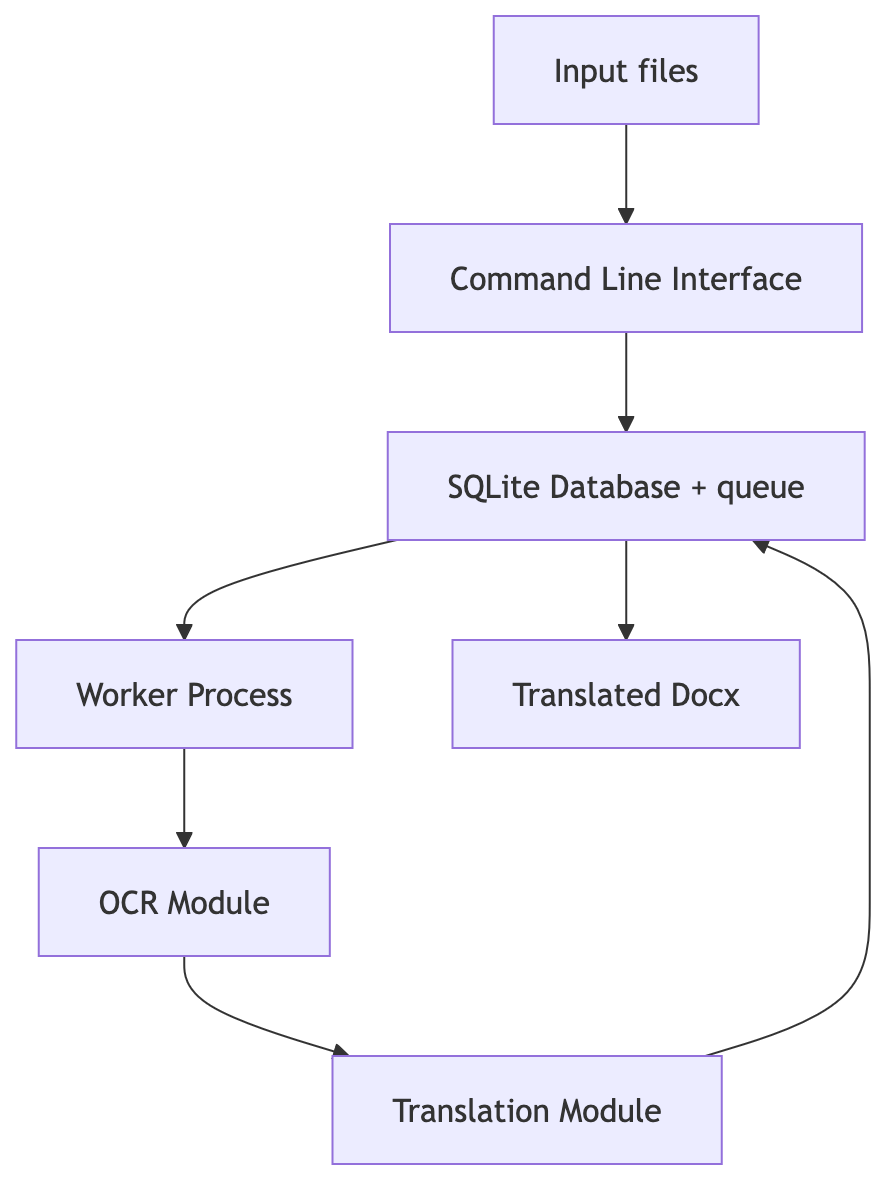
The overall system was intentionally minimal. My goal was to keep the operational overhead low and make everything run on a single machine. I used SQLite as the datastore and implemented an internal queue rather than relying on an external service like Redis. For scheduling, I used Launchd to run translation jobs at night. Most of the design decisions were driven by one objective: maximize translation throughput without sacrificing translation quality.
The first challenge was text extraction. All I had were HD images of the book’s pages, so I needed an OCR solution. I experimented with several local VLMs, but none of them performed well enough. In the end, Gemini 3.1 Flash Lite Preview, which was available on the free tier, worked remarkably well for the images I had.
Once I had reliable text extraction, the next question was which translation model to use.
My first choice was Tiny Aya. It was extremely fast and reasonably accurate, but like many models in its size class, it was prone to hallucination. I eventually settled on TranslateGemma 12B, quantized to 4-bit. It offered the best translation quality I could fit on my laptop.
I ran the model using the mlx-lm package. The package provides a convenient high-level API, I still wanted to tune the system for maximum performance. To do that, I profiled a number of configurations, measuring both total runtime and peak memory usage.
The first experiment was to determine the best chunk size for translation. I tested chunk sizes of 100, 200, 500, 1000, and 2000 tokens.
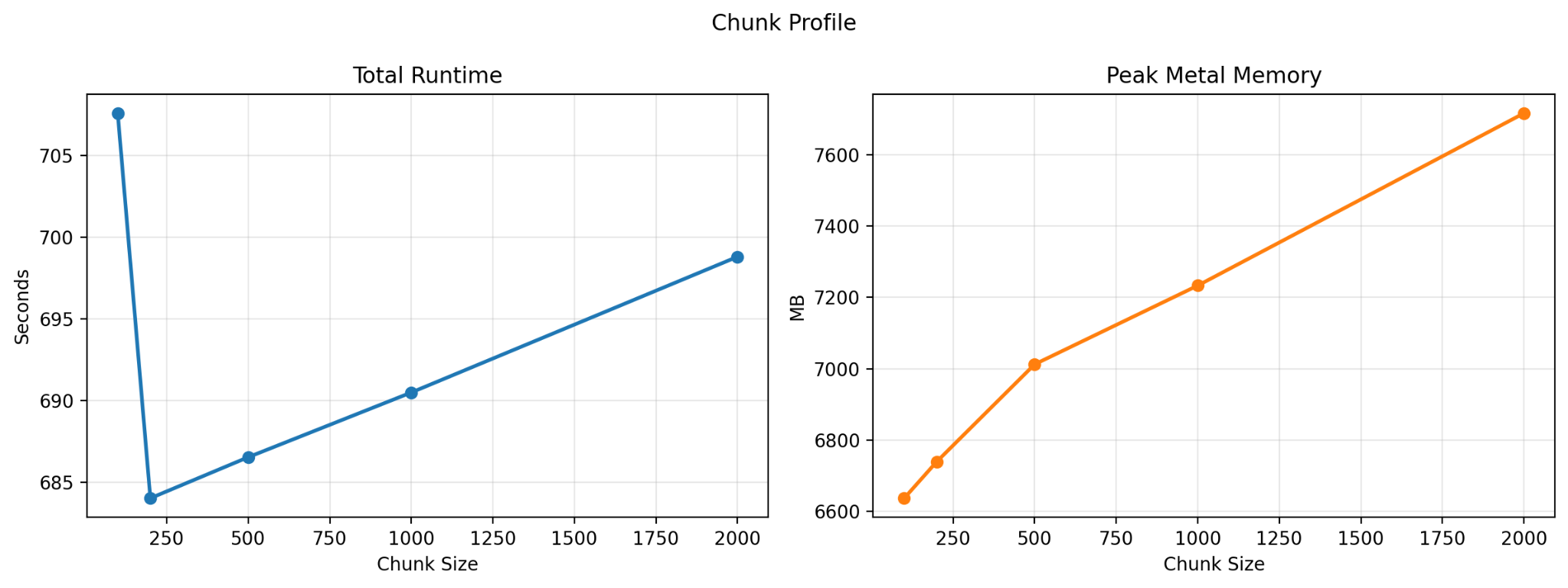
What I found was that performance generally worsened as chunk size increased, with one exception: there was a noticeable dip in total runtime at 200 tokens. In practice, most of my inputs were already in the 200-to-500-token range, and I also found that translation quality was better when I avoided unnecessary chunking. Based on those results, I chose a chunk size of 500 for the remaining experiments.
LLM inference has two phases: prefill and decoding. During prefill, the model processes the input tokens, and because those tokens can be handled independently, this phase is highly parallelizable. During decoding, however, the model generates output tokens one at a time, with each token depending on the previous ones. That sequential process often leaves the GPU underutilized.
To address this, I evaluated two possible optimizations at a fixed chunk size of 500: batched inference and speculative decoding.
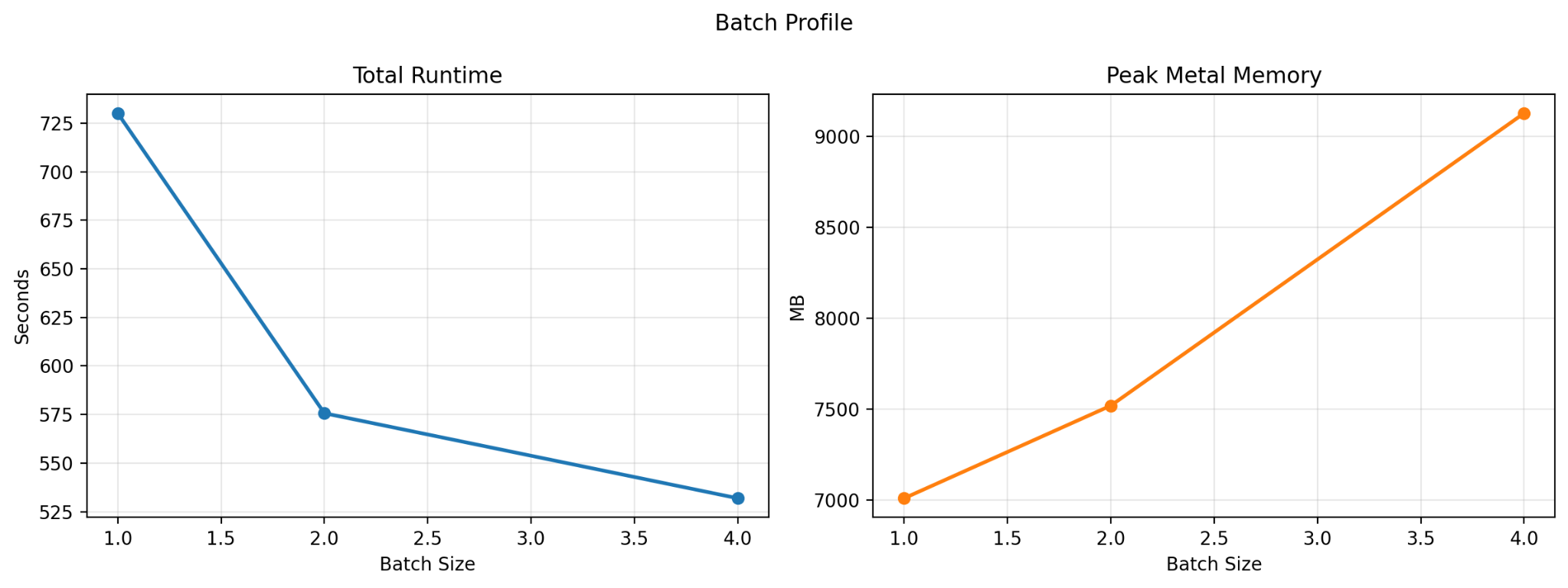
With batched inference, the model processes multiple translation requests at the same time. I profiled batch sizes of 1, 2, and 4; anything beyond that ran out of memory on my machine. The results were straightforward: throughput increased consistently with batch size, though memory usage increased as well.
I also tested speculative decoding. In this setup, inference is shared between two models: a larger target model, TranslateGemma 12B, and a smaller draft model, TranslateGemma 4B. The draft model proposes several tokens at once, and the larger model verifies them. Since verification can be faster than generating each token from scratch, speculative decoding can sometimes speed up generation significantly.
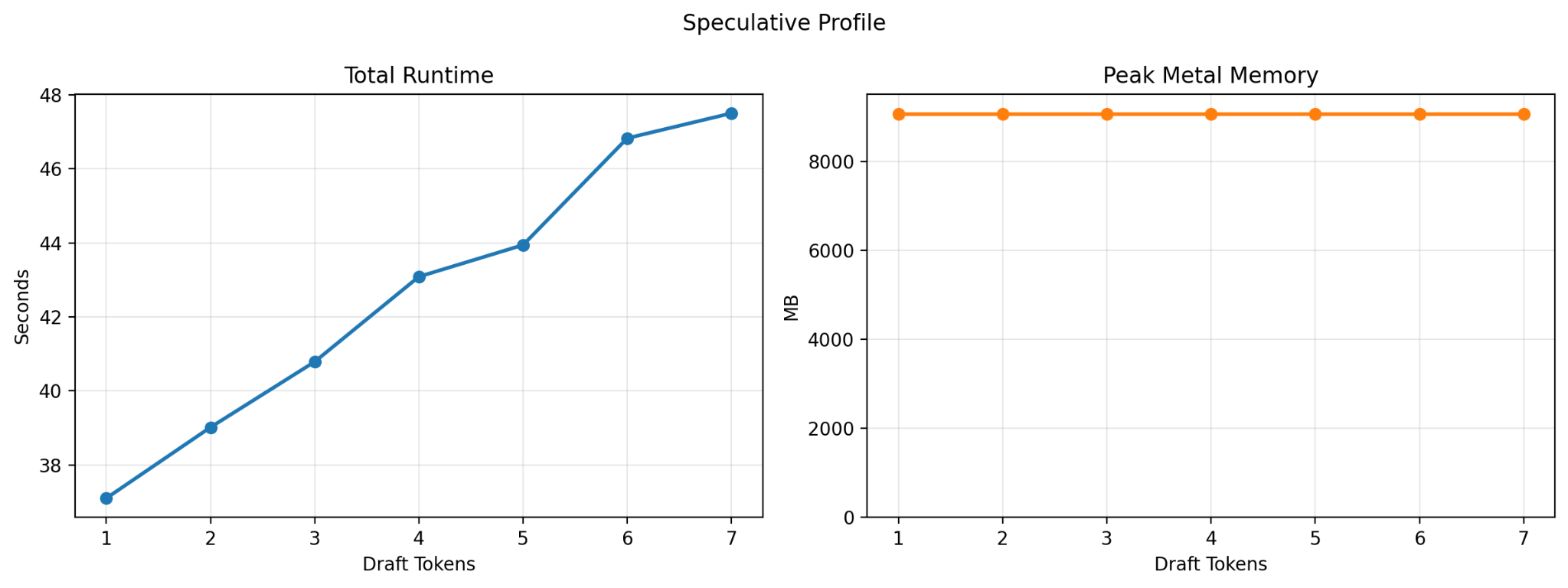
In theory, it was a promising approach. In practice, the results were disappointing. Performance consistently worsened as I increased the number of draft tokens. I ultimately chose a draft-token count of 2 for comparison purposes, since using 1 would have been effectively identical to standard generation.
After comparing all three approaches, batched generation was the clear winner. It delivered significantly higher throughput while adding only a small memory overhead, so that became the final implementation.
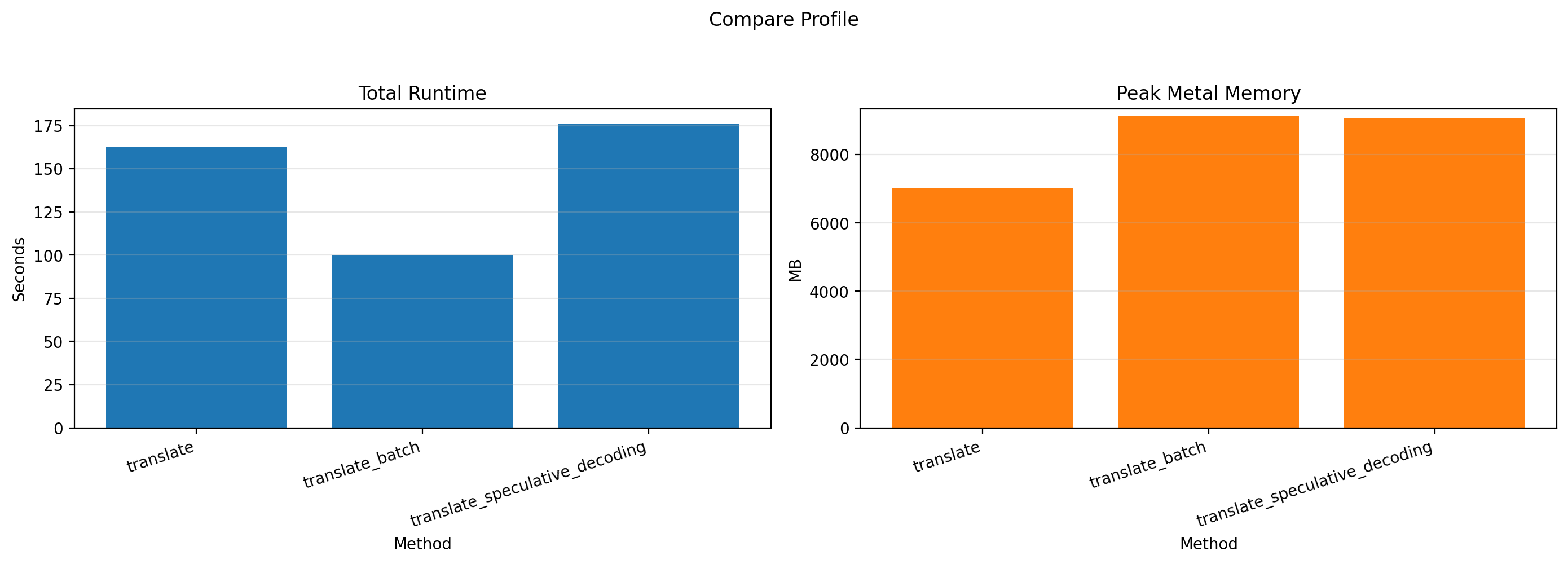
The result was exactly what I had hoped for: I was able to translate an entire book while I ate lunch. When I later proofread the output, I found that I needed to make almost no edits.
So far, I have only tested the system on Bangla-to-English translation, but TranslateGemma supports more than 50 languages, so the same setup should work much more broadly. The project is also open source. You can find the code on GitHub, and extend it with your own models or build additional features on top of it.